Schema inference is convenient. In production or benchmarking, it is often a silent performance killer.
Should you infer schema in your production code?
To show the impact I want to highlight a benchmark that included Fabric Spark on a single 19GB CSV input file (100M Contoso dataset, sales table) for the benchmark. While there were a number of issue with this benchmark that inadvertently make Spark appear to be slow, this is only focused on the impact of inferring schema and practical recommendations.
Why do I need to define schema and what does schema inference solve for?
The simple reality is that not all file types are created as ideal inputs for data engineering tasks. Some data types like Parquet and Avro, self contain metadata headers which describe the schema, so that your engine of choice (i.e. Spark) doesn’t have to do any extra work to know how to interpret the bytes of data that are being read.
Others, like CSV and JSON, are really just text files with an implicit schema contract.
- CSV: the contract is that columns are separated by commas, and rows are separated by line breaks. Enclosed double quotes explicitly indicate something is a string, but everything else is generally up for interpretation. There’s no explicit integers, floats, etc.
- JSON: the contract all revolves around braces
{}and brackets[]and other string characters to positionally indicate when a thing begins and ends. JSON has much more than can be explicitly inferred, but, the challenge still exists where an engine needs to parse the JSON structure and map it into a schema.
If there’s any takeaway here it is that defining schema or needing to infer schema is not an engine problem, it is a file type problem. If files don’t provide full instruction on how to accurately know the meaning behind bytes of data, the engine needs to do potentially a lot of extra work to read the data.
If you have the choice of input data format, always choose an explicit self-defining file type like Parquet or Avro.
The hidden cost of schema inference
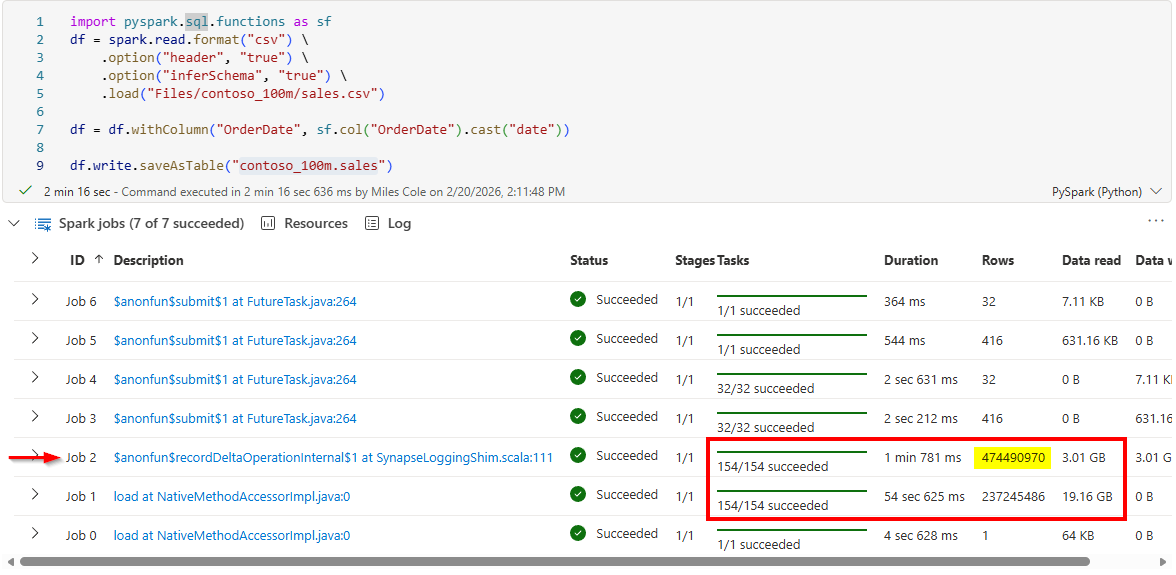
Back to the benchmark example. I ran this on a Spark Pool with 4 x 8-core workers (5 Medium nodes). The first step is reading in an innocous Constoso sales CSV file and saving as a Delta table:
Note: this ignores the partitioning in the original benchmark as this dataset isn’t big enough to be partitioned. I’ll cover the theory and best practices on partitioning in another blog.
1
2
3
4
5
6
7
8
9
import pyspark.sql.functions as sf
df = spark.read.format("csv") \
    .option("header", "true") \
    .option("inferSchema", "true") \
    .load("Files/contoso_100m/sales.csv")

df = df.withColumn("OrderDate", sf.col("OrderDate").cast("date"))

df.write.saveAsTable("contoso_100m.sales")
After running the code I noticed some suspect metrics in the Notebook cell metrics: why does Job 2 process 2x as many rows as Job 1?
I then clicked into that Job to view it in the Spark UI and the answer became clear on the Stage details page:
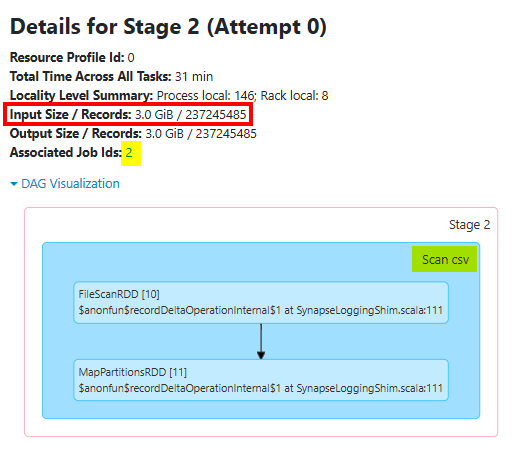
This is the Job/Stage that is reading and writing the CSV data, 237M rows as input, 237M rows as output. So what is Job 1 doing where it also reads 237M rows??? Meet schema inference.
Given that there’s no schema contract with CSV files beyond the column and row separators, the only way to accurately infer the schema of a large bounded set of comma-separated rows, is to read the entire thing. Afterall, if you were to have a string value in the very last row of what you think is an integer column, only doing a sampling wouldn’t provide protection against processing the first 237,245,484 rows of data and then failing the process on row 237,245,485 as string data is encountered. Because CSV carries no type metadata, Spark must scan the entire dataset to determine the most permissive data type for each column, and then scan the file a second time (but potentially from cache to limit network I/O) to read it in the context of that schema.
If a double scan wasn’t bad enough, Schema inference also blocks predicate pushdown during the initial read. Because everything is initially read as string during the inference pass, Spark cannot optimize based on actual data types.
Is the answer to remove the option("inferSchema", "true") line? No, because Spark will otherwise read nearly all data types in a CSV as strings. So we still need to know the schema and apply it in an efficient way, especially if this is a job that we want to put into production.
Most engineers then next assume that option("sampleRatio", "0.01") can come in and save the day (to sample 1% of rows), but the reality is that the sampleRatio applies to data already scanned. This means that you’d read 100% of data into memory and then use 1% of the rows to infer the schema.
Because CSV files contain no row index, footer metadata, or embedded schema, Spark cannot jump directly to a representative 1% of the records. It must scan through the entire file, parse the record boundaries, and probabilistically select approximately 1% of those records for inference. The sample reduces the amount of data used to evaluate column types, but it does not eliminate the full I/O scan of the source file.
Option 1: Sample and define an static Struct in your source code
You could, of course, let Spark read the entire CSV during development, capture df.schema, and paste the resulting StructType into your application. For a very large CSV dataset, however, that initial inference pass may take hours.
A faster, although somewhat hacky alternative, is to read only the first N records directly from the underlying filesystem, parallelize that small sample, and pass it back through Spark’s standard CSV reader with schema inference enabled. This preserves Spark’s built-in CSV parsing and type inference while avoiding a full scan of the original dataset:
1
2
3
4
5
6
7
8
9
10
11
12
13
14
15
16
17
18
19
20
21
22
23
24
25
26
27
28
29
30
31
32
33
34
35
def get_csv_schema(path: str):
    sample_rows = 1_000

    jvm = spark._jvm
    path = jvm.org.apache.hadoop.fs.Path(csv_path)
    fs = path.getFileSystem(spark._jsc.hadoopConfiguration())

    reader = jvm.java.io.BufferedReader(
        jvm.java.io.InputStreamReader(fs.open(path))
    )

    try:
        lines = []

        for _ in range(sample_rows + 1):  # Header + data rows
            line = reader.readLine()

            if line is None:
                break

            lines.append(line)
    finally:
        reader.close()

    schema = (
        spark.read
        .option("header", True)
        .option("inferSchema", True)
        .csv(spark.sparkContext.parallelize(lines, 1))
        .schema
    )

    return schema

schema = get_csv_schema("Files/contoso_100m/sales.csv")
This runs in about 5 seconds. Maybe not exactly easy given the amount of code, however certainly worth exposing this as a function for development purposes. Why wait an unknown amount of time to read some massive CSV file when you could get the schema in 1 second?
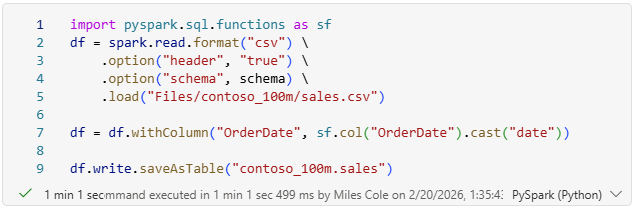
I then created a static schema variable with the output of the function:
1
schema = StructType([StructField('OrderKey', IntegerType(), True)...])
Using a schema variable with this static struct made this specific CSV to Delta process 2x faster. From ~2+ minutes down to just sub 1 minute!
Option 2: commit a sample of your CSV to GIT, deploy, and sample at runtime
We could commit a simple 1 or 2 row CSV file with the expected schema into our Git repo which then becomes the schema contract for our ELT process. While I prefer defining a static struct in source code (Option 1), this is a valid technique and has some benefits. I.e. not needing to define or manage complex struct objects. When a new column is required, it may be easier to update the simple CSV file in your source code rather than change the complex struct.
Option 3: I still need schema flexibility at runtime!
Let’s say that you have some process where schema changes frequently and it is guaranteed to be consistent across the entire dataset, you could conceptually add the same sampling code from Option 1 into your actual pipeline so that the schema is always dynamic. I would avoid if at all possible. Dynamic schema detection shifts failure from compile-time to runtime. That may be acceptable in exploratory workflows, but it is risky in production pipelines. It basically signifies that there is zero data contract with your source data provider and that is not a good position to be in as a data engineer. If you instead put the sample file or Struct in your source code, you are communicating up front with any code release, that this pipeline will only run successful if the inputs match what the code base expects.
Overall Performance Impact
To recap where we improved from I’ve created the following table for the impact on this specific CSV example. You decide if 2x slower jobs is worth inferring CSV schema at runtime.
| Scenario | Execution Time | Est. CUs |
|---|---|---|
| CSV -> Delta: Infer Schema | 00:02:16 | 2,720 |
| CSV -> Delta: Schema Sampling Trick | 00:00:49 | 980 |
| CSV -> Delta: Statically Defined Schema | 00:00:44 | 880 |
Schema inference is convenient. Convenience is expensive at scale. In production and in benchmarking, define your schema.